How to Build a Lead Follow-Up System That Turns More Inquiries Into Customers
A potential client fills out the contact form on your website on a Tuesday afternoon. The message lands in a shared inbox. Two people see it, and each assumes the other replied. By Thursday, nobody has. The prospect isn’t upset. They just booked a call with the next company that got back to them.
Moments like this rarely show up in a report, which is why they’re easy to miss. Most businesses don’t lose leads because their marketing failed to bring them in. They lose them in the gaps between an inquiry and a real conversation: a message that sits, a follow-up nobody owns, a lead who was “not ready yet” and never heard from you again.
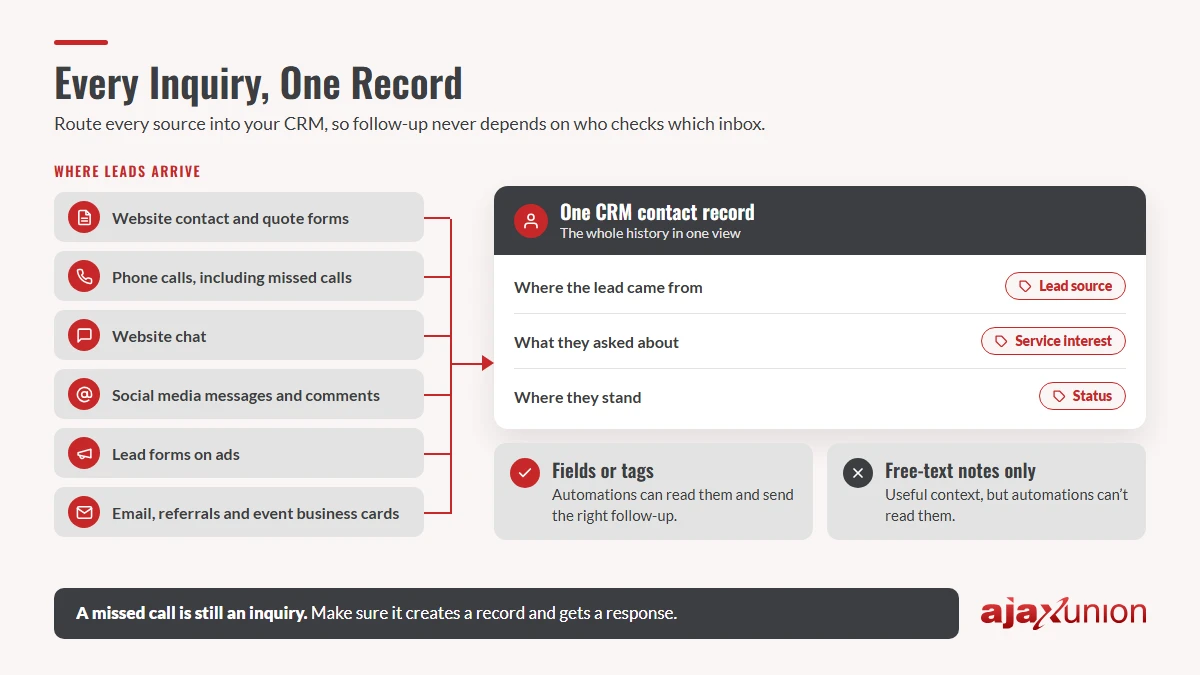
The fix usually isn’t more leads. It’s a follow-up system: a clear path every inquiry takes, from the moment it arrives until it becomes a customer or a clear “not right now.” Below is how to build one, step by step. Automation handles the repetitive parts, and your team stays focused on the conversations that need a person.
1. Capture Every Inquiry in One Place
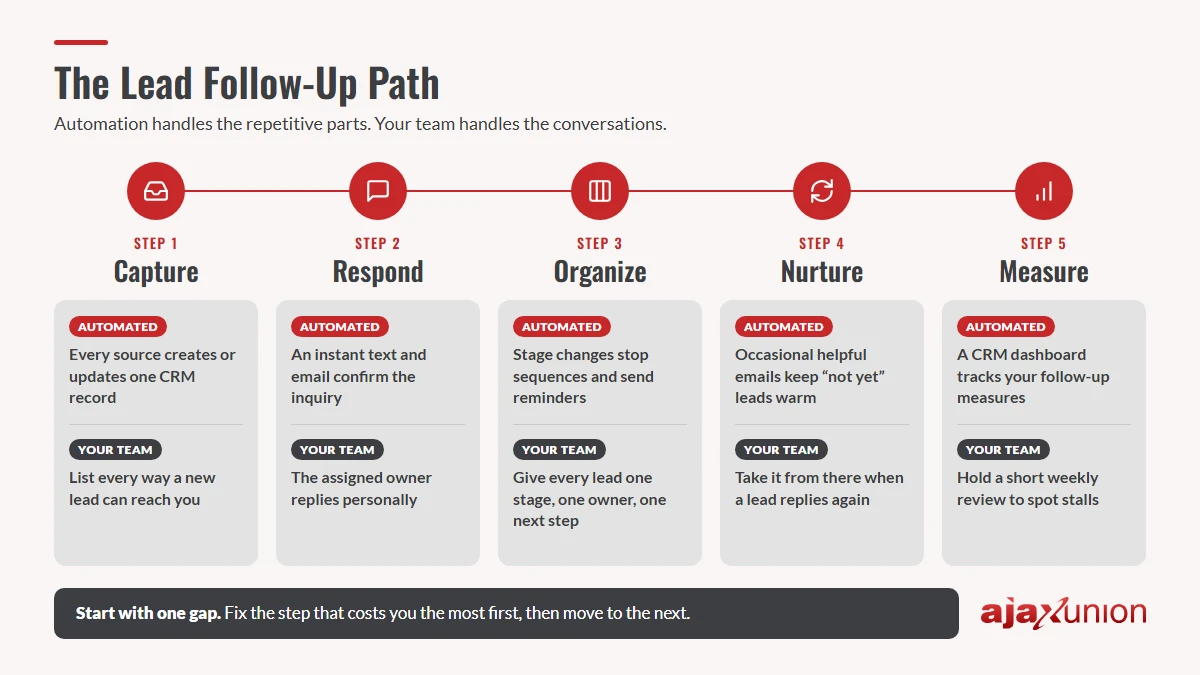
You can’t follow up on a lead you don’t know about. For many businesses, inquiries arrive in several places at once:
- Website contact and quote forms
- Phone calls, including the ones nobody answered
- Website chat
- Social media messages and comments
- Lead forms on ads
- Email, referrals, and business cards from events
When each of these lives in a different inbox or app, follow-up depends on who happens to check what. Start with a quick inventory. Write down every way a new lead can reach you, and next to each one, note where that inquiry goes today and who sees it.
Then route every source into one place: your CRM. Each new inquiry should create (or update) a single contact record, so your team sees the whole history in one view instead of piecing it together from texts, emails, and sticky notes.
Record the details your follow-up depends on. As each lead comes in, capture a few basics in a consistent way: where the lead came from, what they asked about, and their status. Save these as structured fields or tags, not as free-text notes. A note is useful for context, but automations can’t read it. If a form logs “interested in consulting” as a note while your follow-up is waiting for a tag, that lead quietly never gets a reply. Nothing looks broken; the message just never goes out. This guide on how tags trigger (or silently break) your automations walks through how to check.
Don’t forget missed calls. A call that goes to voicemail is still an inquiry. Make sure missed calls create a record and get a response, such as an automatic text letting the caller know you’ll call back, so they don’t slip through just because the phone rang at a busy moment.
2. Respond Fast, Then Follow Up With a Purpose
The first reply sets the tone for everything after it. It should do two jobs: reassure the person that their message arrived, and start a real conversation.
Confirm instantly, then hand off to a person. An automatic text and email can go out the moment an inquiry arrives, thanking the person and telling them what happens next. At the same time, assign the lead to a named team member with a task to reply personally. The automation guarantees a fast acknowledgment. The person makes it a conversation. Choose a response standard your team can actually keep, write it down, and make sure everyone knows who covers evenings, weekends, and days off.
Plan the next few touches before you need them. Many leads won’t reply to the first message. That rarely means they aren’t interested; they’re busy. A short follow-up sequence keeps you present without becoming pushy. Here’s an illustrative example for a service business:
| When | Channel | What it says |
|---|---|---|
| Right away | Text + email | Thanks for reaching out; here’s what happens next and when we’ll call |
| Same day | Call or personal email | A real reply from the assigned team member |
| Day 2 | A helpful answer to a question most new leads ask | |
| Day 4 | Text | A short check-in: “Is there a good time to talk this week?” |
| Day 8 | A simple note asking whether they’d like to keep the conversation going or pick it up later |
Adjust the timing and channels to your business. What matters is that each message is useful on its own, not just a reminder that you’re waiting.
Set stop rules. A sequence should end the moment the lead replies, books a call, or asks you to stop. Nothing damages trust faster than an automated “just checking in” a day after someone already answered. When a lead responds, the automation should step aside and alert the team member who owns the lead.
Make automated messages sound personal. Merge fields fill in the lead’s name, the service they asked about, and the right team member’s details, so messages read like they were written for that person. This complete guide to merge fields shows how they work in emails and texts.
Where AI Fits in Follow-Up
AI is most useful for the conversations that repeat. An AI agent can answer common questions after hours using your own FAQs and policies, ask a few intake questions to understand what a lead needs, and route the conversation to the right place, whether that’s sales, support, or someone else on your team. Before a sales call, an AI summary can pull a contact’s history into a few lines so your team walks in prepared.
In Ajax Union Martech, for example, you can build AI agents that route conversations and answer questions and use a contact summary agent to get up to speed on a lead in seconds.
Keep people in charge of what needs judgment: pricing discussions, objections, sensitive questions, and relationships. A good rule of thumb is to let AI handle the questions you answer the same way every time, and save your team’s time for the ones that are different.
3. Organize Leads in a Pipeline That Tells You What to Do Next
A list of contacts tells you who reached out. A pipeline tells you where each lead stands and what has to happen next. Most businesses need only five or six stages. What makes them useful is a clear rule for moving a lead from one stage to the next.
| Stage | A lead moves here when… | Next step |
|---|---|---|
| New | An inquiry arrives from any source | Confirm and assign an owner |
| Contacted | Your team has had a real two-way exchange | Learn what they need |
| Qualified | You’ve confirmed fit, need, and timing | Send a proposal, quote, or booking link |
| Proposal sent | They have your pricing or plan | Answer questions; follow up on a set schedule |
| Won | They’ve agreed to buy | Hand off to onboarding or delivery |
| Not now / Lost | They’ve declined, gone quiet, or aren’t a fit | Record the reason; move to long-term nurture |
Rename the stages to fit how you sell. Just make sure every lead has one stage, one owner, and one clear next step.
Let the pipeline drive the reminders. Once stages are defined, automation can keep things moving. When a lead replies, it can move to the next stage and stop the follow-up sequence. When a lead sits in one stage too long, the owner can get a reminder. When a proposal goes out, a follow-up schedule can start on its own. Your team spends less time remembering and more time talking to people.
Keep “not yet” leads warm. A lead who isn’t ready today may be ready in three months. Instead of deleting them, move them into a long-term nurture track: an occasional, genuinely helpful email, such as a useful tip, an answer to a common question, or a short update, at a pace that keeps you in mind without crowding their inbox. If they reply or show interest again, move them back into the active pipeline and let a person take it from there.
For leads that have gone fully quiet, a short, plain, personal check-in often works better than a polished campaign. This step-by-step guide to waking up the cold leads already in your CRM shows how to set one up.
4. Measure Follow-Up, Not Just Lead Volume
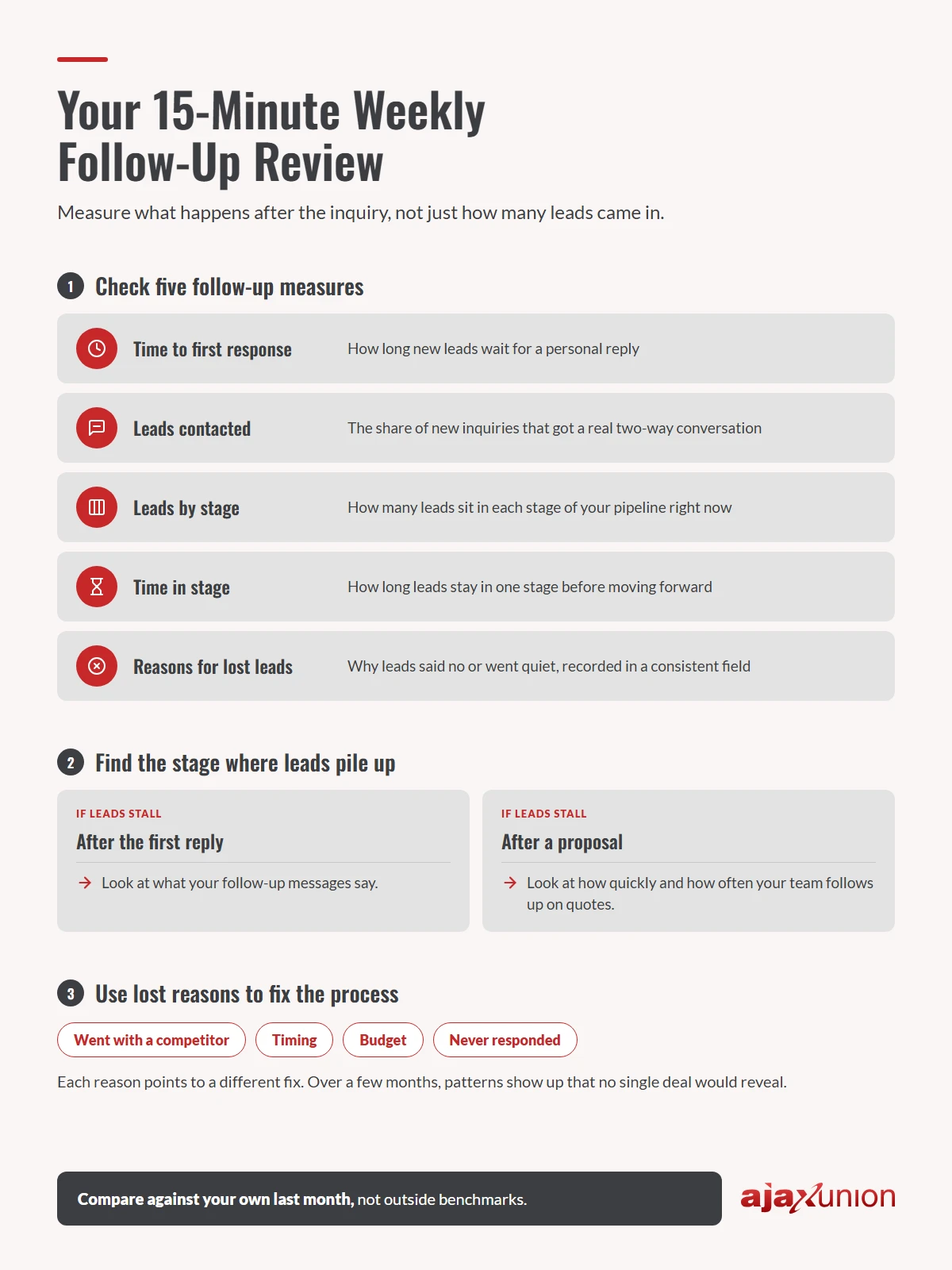
Most marketing reports count leads. Few show what happened to those leads afterward, and that’s where the useful answers are. A handful of follow-up measures will tell you whether your system is working:
- Time to first response: how long new leads wait for a personal reply
- Leads contacted: the share of new inquiries that got a real two-way conversation
- Leads by stage: how many leads sit in each stage of your pipeline right now
- Time in stage: how long leads stay in one stage before moving forward
- Reasons for lost leads: why leads said no or went quiet, recorded in a consistent field
A dashboard in your CRM can show most of these without anyone building a spreadsheet.
Hold a short weekly review. Fifteen minutes is enough. Look for the stage where leads pile up, because that’s usually where your process needs attention. If leads stall after the first reply, look at what your follow-up messages say. If they stall after a proposal, look at how quickly and how often your team follows up on quotes.
Use lost reasons to fix the process. “Went with a competitor,” “timing,” “budget,” and “never responded” each point to a different fix. Over a few months, patterns show up that no single deal would reveal.
Compare your numbers to your own last month rather than to outside benchmarks. Every business, audience, and sales cycle is different, and steady improvement against your own baseline is the clearest sign that your follow-up system is doing its job.
Start With One Gap
You don’t need to build the whole system this week. Pick the gap that costs you the most, whether that’s inquiries scattered across inboxes, slow first replies, or leads that go quiet after a quote, and fix that one first. Once it runs reliably, move to the next.
If you’d like those pieces working together, Ajax Union Martech brings lead capture, automated follow-up, your CRM pipeline, AI agents, and reporting into one platform. The Ajax Union team is available every day to help you set it up around the way your business actually sells.
Not sure where your biggest gap is? Join one of Ajax Union’s free monthly strategy sessions and talk it through with our team.
Frequently Asked Questions
How many times should I follow up with a new lead?
There’s no single right number. A short sequence of a few useful touches over the first week or two works for many businesses. Stop as soon as the lead replies or books, then move quiet leads into a slower nurture track instead of continuing to chase them.
Should I follow up by email or text?
Usually both. Text works well for quick confirmations and check-ins, and email suits longer, helpful content. Respect each lead’s preferences, and only text people who have agreed to receive messages from you.
Will automated follow-up feel impersonal?
Not if you use it for the right jobs. Let automation confirm, remind, and keep things on schedule, and keep the real conversations human. Using the lead’s name and the details they shared helps every message feel relevant.
Do I need a CRM for this?
A CRM makes it much easier. It keeps every inquiry, message, and stage in one record, so follow-up doesn’t depend on someone’s memory or inbox.
Thanks for reading!