Your Marketing Tech Stack Audit: How to Cut Tools and Get Better Results
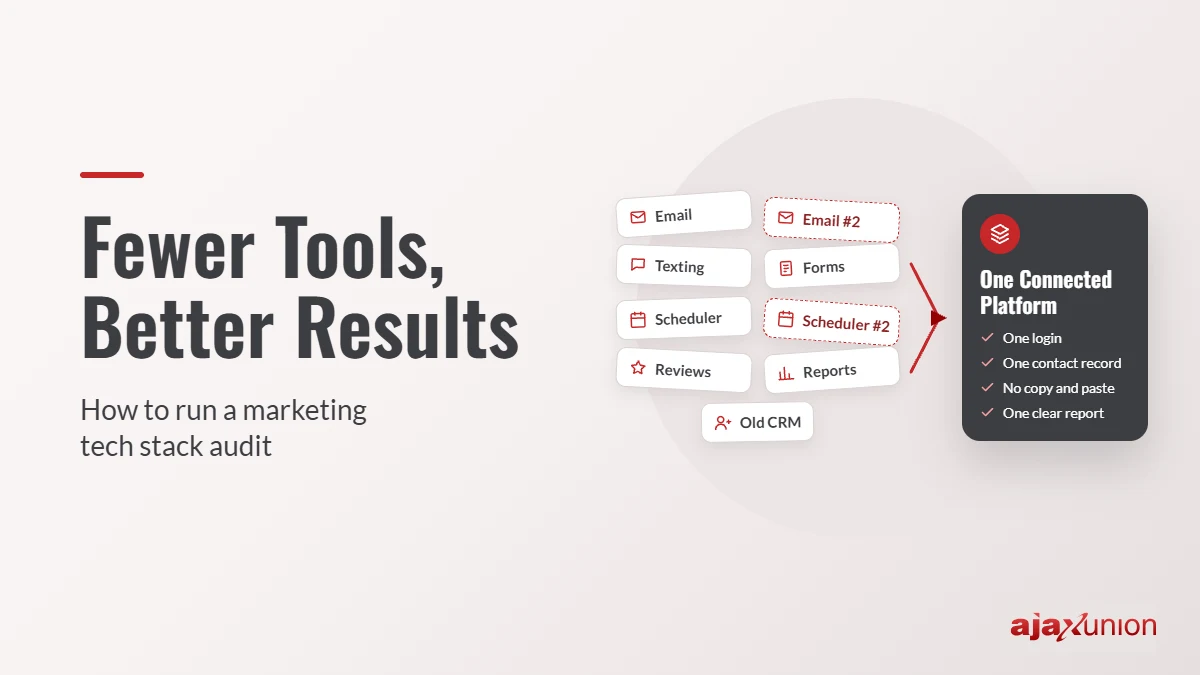
Look at last month’s card statement and count the marketing tools on it. An email platform, a scheduling app, a form builder, a texting service, a review tool, a social scheduler, a CRM someone set up two years ago. Each one made sense when you signed up. Together, they cost more than you think, and half your team isn’t sure which one holds the real customer list.
This is common, even at companies with full marketing teams. Gartner’s latest martech research found that marketers actively use only about half (49%) of their marketing technology. And in MarTech’s 2025 State of Your Stack survey, 65.7% of organizations named data integration as their biggest stack-management challenge. The tools exist. They just don’t get used fully, and they don’t talk to each other.
A marketing tech stack audit fixes that. It’s a structured review of every tool you pay for: what it costs, what job it does, whether anyone uses it, and how it connects to everything else. You don’t need a consultant or special software. You need a spreadsheet and two or three focused hours. Here’s how to do it, step by step.
1. List Every Tool You Pay For
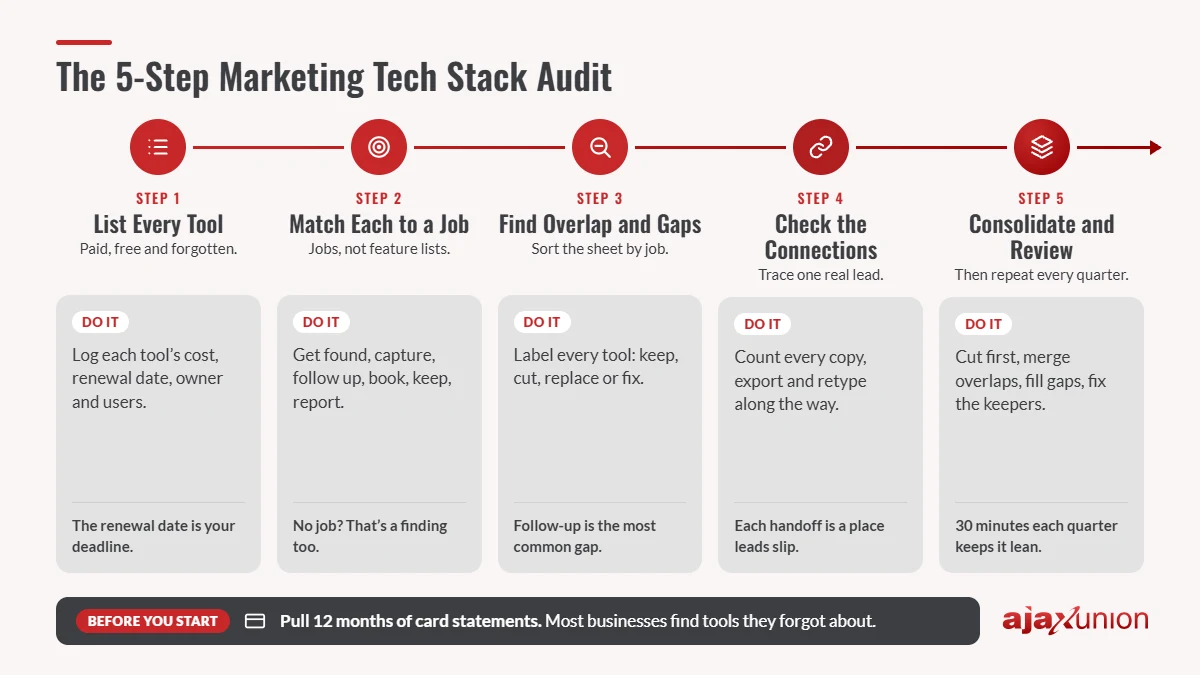
Start with a complete inventory. Most businesses find tools they forgot about, so check more than one place:
- Credit card and bank statements for the last 12 months
- Your accounting software’s list of recurring vendors
- App marketplace and add-on subscriptions inside the tools you already use
- Each team member, by asking: “What do you log into for marketing or sales?”
Create one row per tool in a spreadsheet with these columns: tool name, monthly cost (including per-seat fees), renewal date, owner, who actually uses it, and what it does. Include free tools too. A free form builder that sends leads to someone’s personal inbox is still part of your stack, and still a place leads can get lost.
Don’t skip the renewal date. It tells you how much time you have to make a decision before you pay for another year.
2. Match Each Tool to a Job
Next, ignore the feature lists and ask what job each tool does in your marketing. Nearly every business needs the same handful of jobs covered, from getting found to reporting on results:
| Marketing job | Common tools | Question to ask |
|---|---|---|
| Get found | Website, SEO tools, Google Business Profile | Can people find us and see that we’re credible? |
| Capture leads | Forms, chat, phone, landing pages | Does every inquiry land in one place? |
| Follow up | Email, text, CRM tasks | Does every lead get a fast reply and a next step? |
| Book and sell | Scheduling, estimates, invoicing | Can a ready buyer book or pay without back-and-forth? |
| Keep and grow | Newsletters, review requests, referrals | Do past customers hear from us and come back? |
| Report | Dashboards, analytics, spreadsheets | Can we see which sources turn into revenue? |
Add a “job” column to your spreadsheet and fill it in for every tool. Some tools will cover several jobs. Others won’t fit any job at all, which is useful information on its own.
3. Find the Overlap and the Gaps
Now sort the spreadsheet by job. Three patterns usually jump out:
Overlap: two or more tools doing the same job. A common example is paying for a separate email platform while your CRM already sends email, or keeping two scheduling apps because different team members prefer different ones.
Unused tools: subscriptions nobody has logged into for 60 to 90 days, or premium plans where you only use the basic features. Check usage or login reports where the tool offers them.
Gaps: jobs no tool covers. Follow-up and reporting are the most common. If inquiries wait hours for a reply, or calls go unanswered with no text-back, that’s a gap. Our guides to building a lead follow-up system and setting up missed-call text-back walk through how to close it.
Then give every tool one label: keep (it does its job and people use it), cut (nobody needs it), replace (the job matters but this tool does it poorly or duplicates another), or fix (the right tool, but it’s set up badly or underused).
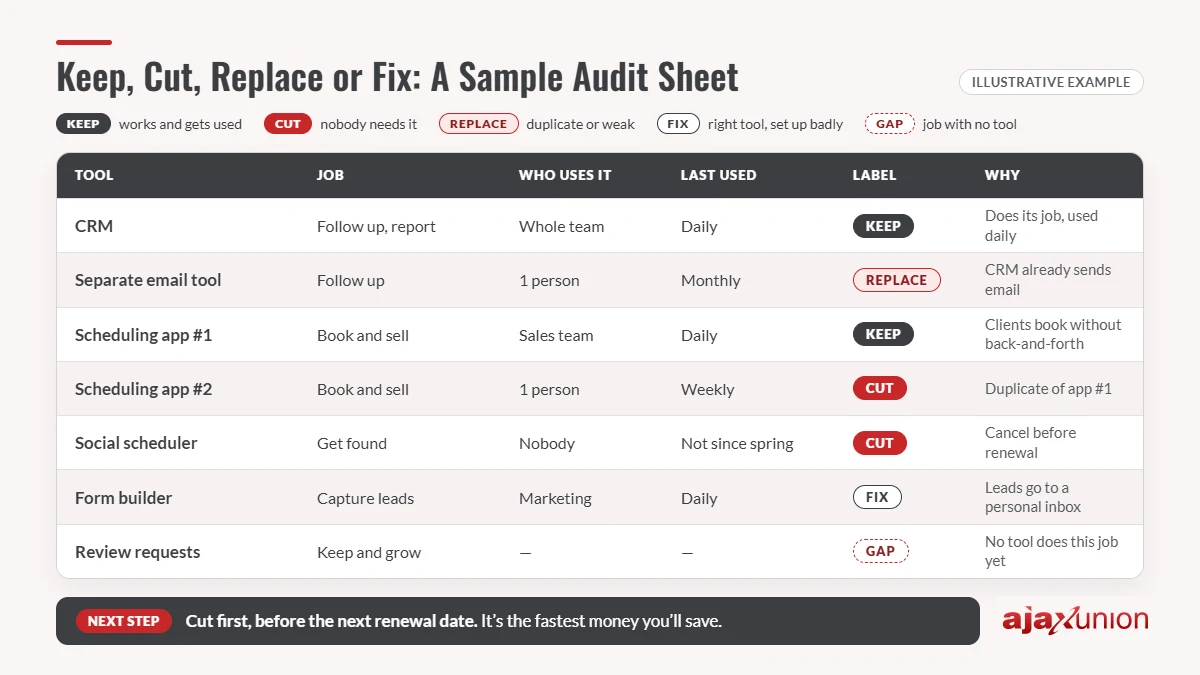
Illustrative example: A 12-person service business lists 11 marketing tools. It finds two email tools, two schedulers, a social scheduler nobody has opened since spring, and no tool that handles review requests. Four tools get cut or replaced, and one gap gets filled.
4. Check How Your Tools Connect
A stack can look fine on paper and still leak leads between tools. To find the leaks, trace one real lead from first contact to paid customer and write down every step.
For each step, ask: does the information move on its own, or does someone have to copy, export or retype it? Every manual handoff adds delay and a chance for a lead to slip through. Look especially for:
- Leads that arrive in one tool and have to be entered into the CRM by hand
- Customer lists exported to a spreadsheet and re-imported somewhere else
- Third-party connectors that link two apps but break without anyone being alerted
- Reports built by pulling numbers from three or four dashboards
Count the handoffs and note who does each one. If your follow-up depends on one person remembering to move a lead from a form tool into the CRM, you’ve found a risk worth fixing first. The 6-month Martech roadmap shows what a connected setup looks like when it’s built in order.
5. Consolidate, Then Review Every Quarter
With your labels and handoff list in hand, make changes in this order:
- Cut first. Cancel unused tools before their next renewal date. This is the fastest money you’ll save.
- Consolidate overlaps. Move each job into the tool that already covers the most jobs well, so you end up with fewer logins and one record per contact.
- Fill the gaps. Add the missing capability, ideally inside a platform you already use rather than as another standalone app.
- Fix the keepers. Set up the features you’re paying for but not using, and give each tool a clear owner.
When you move from one tool to another, protect your data. Export your contacts and history, map the fields to the new system, rebuild any automations, and run both tools side by side for a week or two before you cancel the old one. Train the team before the switch, not after.
Finally, put a 30-minute stack review on the calendar every quarter, and agree on a simple rule for new tools: before anyone signs up, they name the job it does, what it replaces, and who owns it. That rule alone keeps the stack from growing back. If you’re building your 2027 marketing plan now, add the audit results to it, and use them to weigh the return on your marketing automation.
Make Your Stack Easier to Run
Most audits lead to the same conclusion: the problem isn’t a missing tool, it’s too many tools that don’t share information. Ajax Union Martech brings the core jobs into one platform: your CRM and pipeline, forms, email and text, business phone and missed-call workflows, scheduling, review requests, AI agents, and reporting. A new lead becomes a contact, a conversation, a task, and a tracked opportunity without anyone copying details between apps. The Ajax Union team helps you move your data and automations over, so the switch doesn’t stall your marketing.
Finished your audit and not sure what to cut or keep? Bring your spreadsheet to one of Ajax Union’s free strategy sessions, and we’ll talk it through with you.
Frequently Asked Questions
How often should we audit our marketing tech stack?
Do a full audit once a year, ideally before your annual planning, and a quick 30-minute review every quarter to catch new subscriptions and upcoming renewals.
How many marketing tools does a small business need?
There’s no magic number. What matters is that every core job is covered once, by a tool your team actually uses, and that the tools share data. For many small businesses, one all-in-one platform plus a website covers most of it.
Should we replace everything at once?
Usually not. Cut unused tools right away, then consolidate one job at a time, starting with the one where leads are most likely to fall through, which is usually follow-up.
Thanks for reading!